1
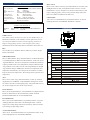
OSD MENU OPERATION
CAMERA SETUP
MEDIUM (LOW/NORMAL/MEDIUM/HIGH)
OFF
(OFF/ON)
ATW
(ATW/AWB)
NORMAL (LOW/NORMAL/HIGH)
DC
(MANUAL/DC)
(OFF/CRR/CRR2)
OFF
AUTO
(OFF/AUTO/GPIO)
ENGLISH (ENGLISH/CHINESE)
DEFAULT (CANCEL)
WDR CONTROL
BLC
WHITE BALANCE
AGC
LENS SELECT
FLUORESCENT
D/N CONTROL
LANGAGE SELECT
SAVE
D/N Control:
Move cursor to D/N Control by Up and Down button, set D/N by Left
andRight button as: OFF; Auto;GPIO: External Control; On. The
illumination is very low at night, so we need to rise the sensitivity and
improve imaging quality, then we can get better image quality. Set
D/N in accordance with different actual need.
SAVE&EXIT:
Move cursor to SAVE&EXIT by Up and Down button, set by Left
and Right button as : SAVE&EXIT;DEFAULT,CANCEL.
WDR ZONE SELECT:
NORMAL METER PRESETS
PRESETS
PRE
WD NROMAL
SAVE
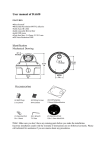
DIMENSIONS
WD NROMAL/SAFE AREA/ATM/LOW1/3
CANCEL
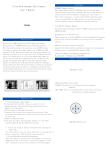
*Specialists press "Left, Right, Left, Right, Down" button enter superior menu.
WDR Control:
Press Enter to show the menu, move the cursor to WDR Control, set
MEDIUM, NORMAL, LOW, HIGHby left and right button; choose
the setting for WDRinaccordance with the lighting condition, set
High in strong lighting contrast to realize higher quality image.
WDR ZONE SELECT:WD NROMAL/SAFE AREA/ATM/LOW 1/3.
BLC:
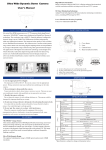
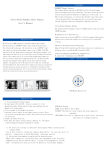
SPECIFICATION
move to BLC by Up and Down button, set BLC by Left and Right
button: On and Off.
Sensor
Sensor
WHITE BALANCE:
Move to White Balance by Up and Down button, set White balance by
WDR control
BLC
-ting condition, so the white color in video image changes if the light
AGC
Control
lighting condition,The color's temperature changes in different ligh
D/N
keep the same color temperature , ATW setting can keep a fixed color
SYNC Mode
Right Button as : NORMAL, LOW and HIGH. Setting AGC is better
for cameras to work in wider lighting range, if the illumination is low,
can set AGC high to rise the sensitivity of cameras.
LENS SELECT:
Move cursor to LENS SELECT, set LENS SELECT by Right and Left
button as :MANUAL,DC:DC Automatically. MANUAL FOR
MANUAL IRIS LENS, DC for AUTO IRIS LENS.
FLUORESCENT:
Move cursor to FLUORESCENT by Up and Down button, set by Left
and Right buttonas: OFF, CRR2: Color Rolling Restrain. Cameras
output color rolling image under fluorescent lamp, CRR can restrain
color rolling, keep the image stable.
LANGAGE SELECT:
Move cursor to LANGAGE SELECT by Up and Down button, set by
Left and Right button as : ENGLISH;CHINESE.
Power
Move cursor to AGC by Up and Down button, set AGC by Left and
0.1Lux
medium, normal, low, high
ON,OFF
normal, low, high
Mode
Tracking White Balance, Auto White Balance(ATW)
White
Balance Automatic
Auto White Balance
temperature automatically. In some special environment, in orderto
AGC:
690HTVL-E
Resolution
S/N Ratio
-ing White Balance. The color's temperature are different in different
temperature
DPS Sensor
PAL/NTSC
Mini illumination
Left and Right button: AWB: Auto White Balance; ATW: Auto Track
-ing condition changes. AWB means cameras can compensate color
1/3
Video Format
OFF, External Control, Auto; ON
INTERNAL
DC12V
Voltage
Current
Lens
<150mA
2.8mm pinhole
Working Temperature
Size
Weight
56(
)*57( H )
100g
*Specification is subject to change without prior notice