1
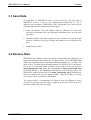
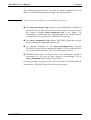
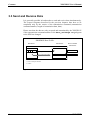
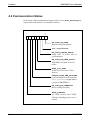
XPS/XPS-E User's Manual Contents 3.1 Send Data To send data via XPS/XPS-E onto a serial end device, the send flag of XPS/XPS-E must be reset (ref. 4.2 Communication Status, Bit 0 = 0), as otherwise the send data to XPS/XPS-E will be discarded. For a send job, the following data must be included into the telegram. • Send job number. This job number must be different for each send procedure. Reasonably, the value should be incremented by 1 at every send procedure. • Send data length. If the data length is set to 0, no data is sent via the serial interface. Otherwise this byte includes the number of the following user data. • Send data (user data) 3.2 Receive Data XPE/XPS-E has a 2Kbyte receive data buffer to temporarily store data received from the connected serial end device. For data transfer to the PROFIBUS-DP Master the operating modes Poll mode and Request-Mode are available. The mode will be selected during parameterisation of XPS/XPS-E by the Master (ref. 2.4.3.5). In the Poll mode available receive data will be sent at every data_exchange.req with the corresponding data_exchange.res from XPS/XPS-E to the PROFIBUS-DP Master. In the Request mode the XPS/XPS-E sends this data only if in data_exchange.req a defined byte has been changed (the receive request number). Thus, the polling of existing receive data can be controlled by the Master. The request mode is recommended for Masters that are polling the slaves cyclically to generate a process image. (application may be too slow to process the current data of the process image). COMSOFT 15