1
HDMI-TPS-TX90/RX90
User’s Manual
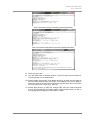
After a successful burning verification starts automatically.
After a successful verification the firmware upgrade terminates.
8. Press any key to exit.
9. Turn the switch back to "Normal" position on the front panel (not necessary for
normal operation, but recommended)
10. Please update the firmware of the RX90 device too as both devices needs to
have the same firmware type and version. The update process for the RX90 is
nearly the same as for the TX90 except for the firmware itself. Be sure to select
the same type as the TX has (e.g. “Normal”).
11. Restart both devices: to make the changes take effect the TX90 and RX90
need to be rebooted after a firmware update. Please power devices off and on
by unplugging and plugging the wall adaptor in again.
Section 6. Firmware update
Page 21 / 31