1
AMERICAN SECURITY USER MANUAL – RULES OF INSTALLATION
3)
4)
5)
6)
7)
8)
9)
10)
11)
12)
13)
14)
performance as sometimes it makes surprisingly big differences, especially when the level of interference or
noise is high and its source is unknown.
If the deactivator is installed close to a dual EAS system it is recommended to place the TX on the side closer to it
and thus lower the interference in RX.
Cables should always be led separately and at the shortest possible distance. Cables should be placed away
from any power or network cables. When longer distances for cabling are required it is neccessary to use
thicker cables/twisted cables, otherwise you could lose voltage and thus power (when using thin cables the
output power at the end of long cables is less than at the input – example: at the input you would have 24V and
at the output 22V). IMPORTANT: No 220/230V cables should be close (or touching) to your cables, especially
when coiled (twisted together)! They are usually placed near tills (cash registers) at points of sale.
If you have interference or noise in the environment you can use a ferrite ring placed on the power cable very
close to the board (mainly receiver) to eliminate or lower the effect of the interference on the EAS system (only
24V DC). REMARK: For best results make some loops of the power cable on it inside the antenna near the
power input of the board.
Try to find a dedicated power line in which to plug in the system. If the system is powered by the same supply
as many other devices, the power signal will not be clean and noise can be picked up by the power cables.
Do not place the EAS system close to any device powered by a pulse power supply (switching power supply).
Such devices may cause interference to the system which will result in lower sensitivity.
When installing a system next to any metal wall, metal frames or a mirror, place the antenna at least 20 cm from
the wall/mirror. If you do not keep this distance the system will automatically reduce sensivity (= worse
detection).
The EAS system should be installed as far as possible from any computer or backup power supply unit. Their
switched power supplies do cause interference and may cause the system to reduce sensitivity automatically.
When installing multiple two-antenna systems (duals) in a store where distances between the TX/RX pairs vary it
is important to set the TX power correctly. Reduce TX power on the system with shorter distance between the
two antennas.
Avoid leaving excess power cable coiled up either near the systems or near the power supply. The cable should
always be cut and shortened to the appropriate length. Excess coiled cable can cause resonance to the system.
When bolting the antennas to the floor, make sure to always use large washers under the heads of the bolts.
This ensures that the antenna will be more securely fastened to the floor and helps avoid loose antennas in the
future. Long bolts will also be more secure.
If resonance, noise, or interference is a serious problem to the system and cannot be eliminated, you may need
to install a different frequency or different technology altogether. If using RF 8.2MHz technology, the most
resistant system is Dual Easydet in two-crossbar antennas.
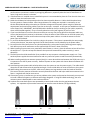
In places where two dual systems are separated by a barrier/wall smaller than the gap between the two
systems, it is important to place either transmitters or receivers near the barrier (see figure below).
A)
B)
RX
TX
TX
RX
TEL: +420 271 960 054
FAX: +420 271 770 732
SUPPORT: +420 296 150 610
technical.support@amersec.com
www.amersec.com
TX
RX
RX
TX
Page 2 of 5