1
Quick Start Guide
Ver. 1. 2
Page 2
View Recorded Images
1.
2.
Click on the Playback button.
Click on the Stop button and the Play Forward button to
replay the sequence.
Shutter time slider
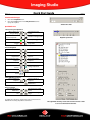
Quick Reference
Camera Set up and Operation
Open camera and
change settings
Preview normal with
the correct exposure
Enable camera record
Trigger
Save settings to the
camera
Preview in low light mode
Playback speed slider
Arm for pre-trigger mode
Sleep mode
View and Playback
Go to last frame
Step forward one frame
Play forward
Go to beginning of the
sequence
Stop
Adjust camera color and
contrast
Flip
Go to first frame
Step back one frame
Playback
Go to the end of the
sequence
Go to frame 0
Change output size
Rotate
Zoom
Cut and Modify a Sequence
Select 1st frame of
sequence
Select last frame of
sequence
Mark frame 0
Store a Sequence
Save stored frames in
RAW format
Download as a movie
file
Auto-download in RAW
format
Download as a single
image
For additional information, download the user’s manual from the
Redlake FTP site at ftp://ftp.redlake.com/motion/ .
The right-hand window provides camera and movie lists as well
as access to advanced function tabs.