1
Station Stop Operation
Manual Operation
In “manual mode” the user will initiate a stop sound sequence through the following
method:
Press the MMM softkey to enter the Manual Mode Menu. Press the FSS softkey to
announce the next stop. Every press of the FSS softkey will play the next available station announcement. Once the desired stop announcement has been made, the system is
armed and will play the sound sequence for the selected stop the next time the trolley
reaches ZV. When the engine departs that station the announcement for the next station
will be made automatically. If the user wishes the engine to stop at this station press the
ARM softkey. If the user does not wish to stop at this station then press the FSS softkey
until the appropriate station announcement is called.
Once a specific stop is selected, subsequent stop selections override the previous one.
Therefore, the user can select a specific stop and then change this request simply by
selecting a different stop by pressing the FSS softkey.
Once a stop sequence is saved as a loop, the user can toggle between OAB and loop
behavior via the FOL softkey.
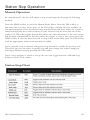
Station Stop Chart
DCS Command System User’s Guide
143