1
GEOSS Architecture Implementation Pilot, Phase 2
Testing Services Engineering Report
•
Version:
1.0
Date: 05/08/2009
Asynchronous: in this solution, the SSE Portal is a SOAP client as well as a SOAP server. The service
provider sends a SOAP message back to SSE when a result is ready. Thus the TOOLBOX RE implements
a SOAP server as well as a SOAP client. The TOOLBOX RE uses the WS-Addressing protocol.
The approach used to build a configurable application that will help the Service Provider to easily convert its service
into a SOAP based service is based on XML scripting. In order to convert a legacy Service into a SOAP service
suitable to be plugged into the SSE framework the Service Provider has to provide one or three XML scripting files.
These files will describe the operations needed to complete a request coming from SSE. More details about the
service XML Script(s) can be found in the section "Tutorial".
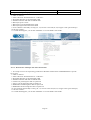
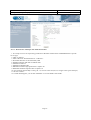
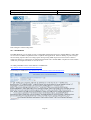
The configuration of the TOOLBOX RE, as well as the configuration and monitoring of the services, occur through
the “TOOLBOX ADMINISTRATOR” Web application coming with the TOOLBOX RE.
13.5.1.2 Services and operations deployed on the TOOLBOX RE.
From the TOOLBOX RE perspective, a service is a collection of operations. Each operation is associated with one
or several XML script files (which must be valid according to the TOOLBOX XML scripting language schema),
depending on the mode the operation is published (synchronous or asynchronous). Further any operation is
associated with a "soapAction": any HTTP request including a SOAP request for a certain operation must have the
HTTP header "SOAPAction" set to that string value. Each operation can be compliant with the SSE ICD and EOLI
ICD or not. This means that the TOOLBOX RE can be used also to deploy services outside from the SSE
framework. Each service can support contemporary both SSE compliant and not SSE compliant operations.
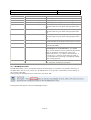
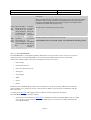
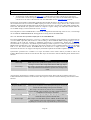
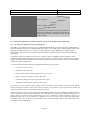
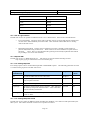
Synchronous operations have a number of 2 scripts associated to them. These must be provided in order to let
Toolbox Runtime Environment execute all tasks. The scripts are referred to with the following name and have these
function:
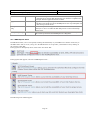
Script
First script
Error script
Function
Main script for the synchronous operation. Executed as soon as the
message is received. This script shall return an XML type object.
This script is executed every time the main script exits for an error.
This script should return an Interface specific error message to the
client.
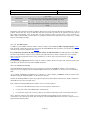
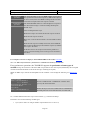
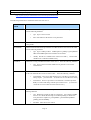
Asynchronous operation have a number of 6 scripts associated to them. These must be provided in order to let
Toolbox Runtime Environment execute all tasks. The scripts are referred to with the following name and have these
function:
Script
Response builder script
Response Builder Error
First script
Second script
Function
This script is executed as soon as the input message is received. It
creates the acknowledge message to be sent back.
This script is executed every time an error occurs during the
response builder script execution. It is used to return an interface
compliant error message to the client.
This is the first script executed just after the response builder. It
should be used to perform all main tasks.
This script is executed until it return a "TRUE" boolean value. This
script should be used to check all operation condition before
completing the execution. This script shall always return a Boolean
Page 58