1
Make the glasses fogging environment.
In a room filled with smoke or dust .
9. Do not use the camera toward strong light for long time, such as the sun..
Spotlight and other light will cause screen aging. Use the camera toward to strong light for
a long time, may be raised CCD of the color filter damage and loss the true color images.
Catalogue
catalogue............................................................................................................................ 2
Chapter 1 Product summarize ........................................................................................... 2
1.1 product synopsis ............................................................................................................ 2
1.2 technical parameters ..................................................................................................... 3
1.3 function explain .............................................................................................................. 4
Chapter 2 equipments’ installation .................................................................................. 6
2.1 camera’s dial-up and switch setting ............................................................................ 6
Chapter 3 Menu setting and operate ................................................................................ 8
3.1 Basic operation .............................................................................................................. 8
3.2 System OSD menu operate........................................................................................... 9
3.2.1 main menu............................................................................................................ 10
3.2.2 menu’s operation .................................................................................................. 10
3.2.3 <SYSTEM INFORMATION> ................................................................................ 11
3.2.4 <ADDR SETTING> .............................................................................................. 11
3.2.5 <MOTION> .......................................................................................................... 12
3.2.6 <SET FRAME SCAN> ............................................................................................ 13
3.2.7 CLEAR FRAME SCAN......................................................................................... 14
3.2.8 PATTERN ............................................................................................................. 14
3.2.9 PROGRAM PATTERN ......................................................................................... 15
3.2.10 CAMERA ......................................................................................................................... 16
Chapter 4 simple error and maintain............................................................................. 20
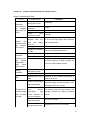
4.1 simple error exclude form .......................................................................................... 20
4.2 After Service ............................................................................................................. 21
2