1
Foscam Digital Technologies LLC
FI8910W Quick Installation Guide
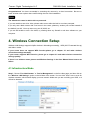
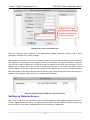
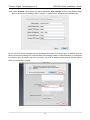
Step 2: Click the SSID (name of your router) in the list, the corresponding information related to your
network, such as the name and the encryption, will be filled into the relevant fields automatically.
NOTE: Sometimes the information filled in may differ from your actual network settings. If you
are unable to connect wirelessly make sure the encryption within your router is correct and the
encryption selected on the page for your wireless network is correct. Try using different
encryptions if you aren’t able to connect with a certain type of encryption.
You will only need to fill in the password of your network. This is listed as “Share Key” on the wireless
settings page. If your password to connect to the internet for your router is 1234567890, you would put
1234567890 in the “Share Key” field. On the same note, if your password is something like foscam12345,
you would put in foscam12345 in the field. Again, make sure that the SSID, Encryption and the password
you filled in are exactly the same for your router.
Wireless Settings
- 20 -