1
Paging Console
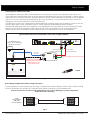
24VDC In
DIP Switches 1-2 Settings
On
SW
Off
PA System Chime Off
1 PA System Chime On
Internal Chime Off
2 Internal Chime On
BGM
Input
BGM Chime Mic
Volume Volume Volume
Fig 1
ON
1 2 3 4
1 2 3 4
1
2
3
4
5
6
7
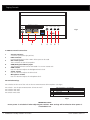
A 4486 Rear Panel Connections
1
2
3
4
5
6
7
24V DC connector
2.1mm DC jack (centre pin positive).
RJ45 connector
For connection back to the A 4487. Either port can be used.
DIP switch options
These switches set the chime options.
BGM (Background Music) Input
The background music can be connected via a 3.5mm Stereo Jack.
BGM volume
Use this volume to adjust the background music level.
Chime volume
Use this volume to adjust the chime level.
Microphone volume
Use this volume to adjust the microphone level.
DIP Switch Settings
DIP switches on the rear of the unit set the Pre-announcement chime options. (See Fig 2)
DIP switch 1 sets the pre-announcement chime on or off.
DIP switch 2 Not used.
DIP switch 3 Not used
DIP Switch 4 Not used
DIP Switches 1-4 Settings
On
SW
Off
1 Pre-announce Chime On Pre-announce Chime Off
Not used
2
3
Not used
4
Not used
Fig 2
IMPORTANT NOTE:
Ensure power is switched off when adjusting DIP switches. New settings will be effective when power is
switched back on.
2 Redback® Proudly Made In Australia
www.altronics.com.au