1
Safety Information
For your own safety and the safety of others, and to prevent possible electrical shock,
fire, or damage to the device, your computer or the MaxiSys tablet on which it is applied,
it is important that the safety instructions herein presented throughout this manual be
read and understood by all persons operating, or coming into contact with, the device.
Before using the device, always refer to and follow the safety messages. Read,
understand, and follow all safety messages and instructions in this manual. Safety
protection built in the device may cease to function if the device is used incorrectly. This
could cause damage to your device, or lead to injury to yourself and others. In addition,
follow all generally accepted safety practices and procedures for working with and
around electricity.
Symbols
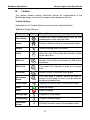
These safety and electrical symbols may appear on the product or in this manual.
Symbols
Description
Direct current.
Alternating current.
Chassis ground terminal.
Device protected throughout by double insulation or reinforced
insulation.
Possibility of electric shock.
Warning.
Static awareness. Static discharge can damage parts.
EN61010 measurement category.
Do not dispose of this product as unsorted municipal waste.
Safety Messages
Safety messages are provided to help prevent personal injury and equipment damage.
All safety messages are introduced by a signal word indicating the hazard level.
DANGER: Indicates conditions or practices that could result in death or serious
injury to the operator or to bystanders.
WARNING: Indicates conditions or practices that could result in damage to the
product or equipment to which it is connected.
ii