1
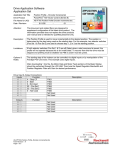
Drive Application Software
Application Set
Parameter Configurations
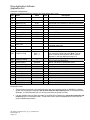
Changes from Default Parameter Settings (Any listed defaults are in gray.)
Par
Name
Value
Link
Description
41Motor NP . . .
per nameplate
(Data entered per motor nameplate)
45
53
Motor Cntl Sel
4 -“FVC Vector”
User should do an autotune for best the performance.
55
Maximum Freq
66 Hz
User should do an autotune for best the performance.
58
Flux Up Time
0.213 Sec.
79
Speed Units
RPM
80
Feedback Select
1 - “Slip Comp”
Encoderless operation
81
Minimum Speed
86 RPM
Twice slip RPM (good for encoderless operation)
90
Speed Ref A Sel
22 -“DPI Port 5”
121
Slip RPM
43 RPM
140
Accel Time 1
2.0 Sec.
142
Decel Time 1
2.0 Sec.
ControlNet communication was used for start/stop
301 Data Links
and speed referencing.
316
***
TorqProve Settings
600
TorqProve Cnfg
601
TorqProve SetUp
602
603
604
605
606
607
608
609
610
611
Spd Dev Band
Spd Band Integrator
Brake Release Time
ZeroSpdFloatTime
Float Tolerance
Brk Set Time
TorqLim SlewRate
BrkSlip Count
Brk Alarm Travel
MicroPos Scale%
Bit 0 = 1
Bit 1 = 1
0
400 RPM
200 mSec.
0.10 Sec
10.0 Sec
150 RPM
0.10 Sec
10.0 Sec
250 Revs
1.0 Rev
10 %
This “enables” TorqProve and Digital Output 1 will
now control the mechanical brake (Note: This will
cause a Fault 28 which requires user to read the
“Attention” in the User Manual on page C-5)
Default – used only if using communications to
control TorqProve parameters.
Default - Not active in Sensorless Vector
Default - Not active in Sensorless Vector
Default
Default - Not used in encoderless mode
Approximately 3 times slip RPM
Default
Default - Not used in encoderless mode
Default - Not used in encoderless mode
Default - Not used in encoderless mode
Default – Not used in this application
Encoderless notes:
•
Though it was not required in this application since the user is always running at 1500RPM, it is always
good to set P81 [Minimum Speed] to two or three times the slip frequency when in encoderless mode.
(Example: A 1740 RPM motor has 2 Hz of slip so set Minimum Speed to 4-6Hz.)
•
It is also desirable (but not 100% necessary) to set P606 [Float Tolerance] to one to three times the slip
frequency when in encoderless mode. This should be set a value that approaches this value but still
gives acceptable performance.
AS_PF700_Overhead_Crane_no_enc_TorqProve.doc
Form Revision – A
Page 2 of 2