1
Genetic Analyzer: Vector NTI Licensing w/o Internet
Dear Bob,
Thank you for contacting Invitrogen Vector NTI Support.
As you have encountered the LMU-23 error, you will have to register the license manually. To do so, please go to the
following website http://www2.informaxinc.com/cgi-bin/regadmin.cgi, fill in the details and click on Register.
You will then have to paste the License number that appears on the screen into the License number field in the License
Manager of Vector NTI
Please also ensure that the license number that you possess has been entered into the License # field of the License
Manager
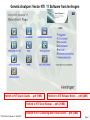
To find the Hardware ID use the following steps 1) Go to Start> All Programs>Invitrogen>Vector NTI Advance 10> License Manager
2) Click on the Applications Tab in the License Manager tab that opens up on the screen.
3) Click on the Static button.
4) You will find the Hardware ID in the corresponding text field in the Static License dialog box.
Hope this information is satisfactory, but do not hesitate to contact us for any further VNTI enquiries.
Best Regards,
Suryakala.k
Vector NTI License Administrator
Life Technologies
bioinfosupport@invitrogen.com
FVCC:BioTech_Morrison 5/24/2012
Page 2