1
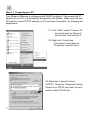
2. A pop-up window will appear. When
prompt for User name and password,
enter the following user id and
password.
User Name:
admin
Password:
admin
* If you have changed the user name
and the password, enter the new user
name and password.
Note: This user name and password
are only for the Web Manager access.
Changing these settings does not
change AxessManager user profile
name and password.
After entering the correct user name and password, the pop up window will
change to a web-based window.
Follow the steps in the chapter “Web Manager User Interface”, “Step 2 Navigate
web-based UI”, page 39 to complete the Modem’s Ethernet and Wi-Fi settings.
27