1
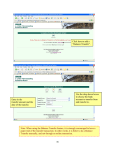
Enter your Query in the space provided. Click ‘Send Query’, and a query will be posted against the
submission. An email is fired in the backend to the customer informing about the ‘Query posting’
event.
b. If you want to update the query:
Select the query and the screen will appear as below.
Select ‘Edit Query’ and you will have an interface as section ‘a’ above. Once updated, email will
be sent to the customer informing about the change/ update in the query.
Customer response to the MIDC query will appear in the “Customer Reply” column.
Approve / Reject
Single Window Clearance MIDC User Manual
Page 13 of 15