1
Table of Contents
Trango
Table of Contents
Preface.................................................................................................................................................................. iii
FCC Information .......................................................................................................iii
Warranty Information ...............................................................................................iii
Chapter 1 Overview................................................................................................................................................3
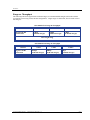
Range vs. Throughput .............................................................................................. 3
System Contents ...................................................................................................... 3
Location of Serial Number & MAC Address.................................................................. 3
Location of RJ-45/LED Port........................................................................................ 3
Chapter 2 Getting Started .......................................................................................................................................3
Connections and Power............................................................................................. 3
Configuration Tools................................................................................................... 3
Troubleshooting Ethernet Connections ....................................................................... 3
System Information (sysinfo) Page ............................................................................ 3
Chapter 3 Configuration .........................................................................................................................................3
Key Concepts ........................................................................................................... 3
Essentials to Establish a Wireless Link ........................................................................ 3
Master Unit Configuration.......................................................................................... 3
Remote Unit Configuration ........................................................................................ 3
Establishing a Wireless Link....................................................................................... 3
Changing IP Address................................................................................................. 3
LEDs ........................................................................................................................ 3
RF Link Loopback Test (linktest command)................................................................. 3
Link Speed & Power Settings ..................................................................................... 3
Command Reference Listing ...................................................................................... 3
Chapter 4 Deployment & Installation.....................................................................................................................3
Site Selection ........................................................................................................... 3
Site survey ............................................................................................................... 3
Channel Planning...................................................................................................... 3
RSSI Command and Antenna Alignment..................................................................... 3
Mounting Hardware .................................................................................................. 3
Grounding ................................................................................................................ 3
Cabling and Weather Considerations .......................................................................... 3
Weather Sealing on EXT Model .................................................................................. 3
Weatherizing............................................................................................................ 3
Chapter 5 SNMP ....................................................................................................................................................3
Chapter 6 Firmware Upgrade Procedure ................................................................................................................3
Appendix A
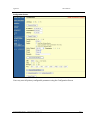
Using the HTTP Interface...........................................................................................................3
Appendix B
Specifications..............................................................................................................................3
Trango Broadband Wireless — Atlas4900 User Manual Rev. 1.3
page ii