1
Functionality
Introduction
The BioSAXS Sample Changer is a machine conceived to:
•
Temporally store liquid samples in plates or strips;
•
Transfer the samples to a pod for them to be exposed to X-rays and optionally recuperated;
•
Clean itself – the needle, tubings and capillary - in order to load samples with no contamination;
•
Control the temperature of the samples in the storage plates and also on the exposure pod.
The user can set the sample viscosity (low, medium or high) – used for adjusting the machine
parameters - and type (green, yellow or red). Yellow samples can be used but not recuperated. Red
samples are not acceptable for automatic transfer, they must be handled manually.
All functionality can be remotely accessed by the beamline control but also commanded by the Sample
Changer’s own graphical user interface.
Plate Loading
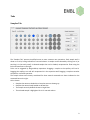
The first step for the user is to load their sample plates into the Sample Changer by clicking the “Load
Position” button on the application side bar, and opening the cover once the plate table stops.
The plates or stripes should be loaded into the thermal supports. The Sample Changer has three slots for
plate supports:
•
4 x (8+3) PCR strip wells.
•
THERMO-FAST 96 well plate.
•
SBS 96 Deep well plate.
NOTE: Attention to use only standard consumables.
NOTE: The plates should be inserted correctly in their slots. The stripes should be inserted completely. If
they are not then the Sample Changer will refuse the loading when scanning for sample overlap.
After loading the plates the user must close the cover and press “Scan and Park” button.
3