1
Chapter 1 - Beginner’s Guide to Using Roxio Easy CD Creator
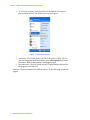
1. To select the program, click Start Menu at the bottom left corner of
your computer screen. The following screen will appear:
Figure 1. Start Menu screen
2. Select Easy CD Creator on the left side of the screen. If Easy CD Creator does not appear in the Start Menu, go to All Programs and select it
from there. Wait for the program’s start page to open.
3. Insert the music CD to be copied into the CD player/burner and wait for
the program to load the CD.
Once the CD player/burner has loaded the music CD, the following screen will
appear:
2 — Roxio Easy CD Creator User Manual