1
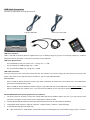
USB Cable Connection There are two USB cables come with the enclosure. Y-Shape USB Cable USB to 5V Power Cable USB Power Limitation USB 1.1 and USB 2.0 protocols limit bus supplied power up to 2.5 Watts (0.5A @ +5V) per port. As more high capacity 2.5” notebook hard drive comes to the market, it consumes more powers from the USB port. USB Power Requirements: - Use Card Reader to read your memory card (0.5A @ +5V)= 1 USB - Use your HDD up to 200GB (0.5A @ +5V) = 1 USB - Use your HDD 250-500GB ( 2 X 0.5A @ +5V) = 2 USB USB Cable Connection: Read your hard drive power consumption requirement first. The USB bus can provide a supply with rated power of 5V/0.5A for USB device. If the current of your hard drive doesn’t exceed 0.5A, use the Y type USB cable ONLY. User scenarios: - Using a 160 GB (or below) Hard Drive, use the Y type cable, 2 USB ports are needed from your notebook or PC. This cable should power up the card reader and 2.5” HDD. - Using a 160GB (or above) Hard Drive, besides using the Y type USB cable, the second USB power cable may be needed. 3 USB ports are needed from your notebook or PC. If you only have two available, use one end of the Y-shape and the USB-5V cable. Window ME/2000/XP/Vista Operating System Driver Installation: 1. No driver program is necessary. Connect the Y-shape USB cable and the USB-5V cable to your PC. If you only have two USB ports from your laptop, connect one end of the Y-shape and the USB to 5V cable. 2. Window will automatically detect the device and start installs the drivers for the card reader and hard drive. 3. Verify/Update driver and device, Open My Computer – System Property - Hardware – Device Manager 4. Format the hard drive (first time install only) Open Control Panel – Administration Tools (Under Performance & Management in Control Panel Category View) – Computer 3/4