1
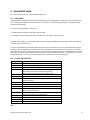
The category identifies the types of floppy disk drive A or drive B that has been installed in the computer.
None
360K, 5.25"
1.2M, 5.25"
720K, 3.5"
1.44M, 3.5"
2.88M, 3.5"
No floppy drive installed
5.25 inch PC-type standard drive; 360K byte
5.25 inch AT-type high-density drive; 1.2M byte (3.5 inch when 3 Mode is Enabled).
3.5 inch double-sided drive; 720K byte
3.5 inch double-sided drive; 1.44M byte
3.5 inch double-sided drive; 2.88M byte
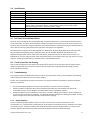
Video
The category selects the default video device
Options: EGA/VGA/CGA40/CGA80/Mono
Halt on
The category determines whether the computer will stop if an error is detected during power up.
NO Errors
All Errors
All, But
Keyboard
All, But
Diskette
All, But
Disk/Key
The system boot will not stop for any error that may be detected
Whenever the BIOS detects a non-fatal error the system will be stopped and you will be prompted
The system boot will not stop for a keyboard error; but will stop for all other errors
The system boot will not stop for a disk error; but will stop for all other errors
The system boot will not stop for a keyboard or disk error; but will stop for all other errors
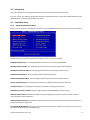
4.5.3. Advanced BIOS Features
If the ADVANCED BIOS FEATURES option is selected from the main menu, the screen below will appear. The following
sample screen consists of the default values for the DisplayPac-OPR.
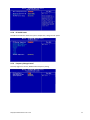
4.5.4. Advanced Chipset Features
If the ADVANCED CHIPSET FEATURES option is selected from the main menu, the screen below will appear. The
following sample screen consists of the default values for the DisplayPac-OPR.
DisplayPac-OPR Hardware User Guide
4-4