1
ENGLISH
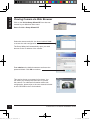
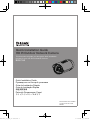
2. Hardware Overview
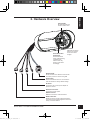
Infrared LEDs
IR LEDs Illuminate the
camera's field of view
IR-Cut Removable
(ICR) Sensor
IR-Cut Removable
sensor judges lighting
conditions and
switches from day
mode to night mode
accordingly
Sunshield
Adjustable sunshield
protects the camera
sensor from direct
sunlight
Ethernet (PoE)
RJ-45 connector is for Ethernet and can also
be used to power the camera using PoE
Reset Button
Press and hold this button for 10 seconds to
reset the camera to factory default settings
DC Power
Connects to the 12V DC power adapter to
power the camera
24V Power Connector
Connects to 24V AC power
RS485 connector
RS485 Connectors for external devices
DI/DO Connectors
DI/DO connectors provide a physical interface
to send and receive digital signals to and from a
variety of external devices
D-Link DCS-7110 Quick Installation Guide
DCS-7110_A1_QIG_v1.00(DI).indd 3
3
2010/11/29 上午 11:58:59