1
11
units of user interface expression on the Android platform. The View class serves as the base
for subclasses called "widgets, " which offer fully implemented User Interface (UI) objects,
like text fields and buttons. The ViewGroup class serves as the base for subclasses called
"layouts, " which offer different kinds of layout architecture, like linear, tabular and relative.
A View object is a data structure whose properties store the layout parameters and content
for a specific rectangular area of the screen. A View object handles its own measurement,
layout, drawing, focus change, scrolling, and key/gesture interactions for the rectangular area
of the screen in which it resides. As an object in the user interface, a View is also a point of
interaction for the user and the receiver of the interaction events.
The Android UI toolkit offers several layout managers that are easy to use to
implement an user interface. This application employs Linear Layout, Frame Layout and
Relative Layout. Linear Layout wraps the TextView, EditText, ListView and Buttons;
MapView exploits Frame Layout and Relative Layout is used in Trip Logger Activity for
displaying the various locations in the trip.
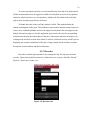
The Android UI framework is organized around a Model-View-Controller pattern. It
provides structure and tools for building a Controller that handles user input (like key presses
and screen taps) and a View that renders graphical information to the screen.
The Model is the soul of the application, what it actually does. The View is the
application’s feedback to the user. The graphical portion of the Android UI framework's
View is implemented as a tree of subclasses of the View class. Graphically, each of these
objects represents a rectangular area on the screen that is completely within the rectangular
area represented by its parent in the tree. The Controller is the portion of an application that
responds to external actions: a keystroke, a screen tap, an incoming call, etc. It is
implemented as an event queue. Each external action is represented as a unique event in the
queue. The framework removes each event from the queue in order and dispatches it.
Figure 3.3 shows MVC concept model [13].
When an external action occurs (for example, when the user scrolls, drags, or presses
a button; a call comes in; or an MP3 player arrives at the end of its playlist), the Android
system enqueues an event representing the action on the event queue. Eventually the event is
dequeued—first in, first out—and dispatched to an appropriate event handler. The handler