1
17
9. OSD MANUAL
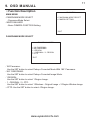
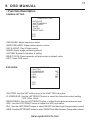
IMAGE
IMAGE
+ GAMMA
+ SHARPNESS
+ CONTRAST
+ SATURATION
+ DNR
7
17
18
OFF
* ESC
* EXIT
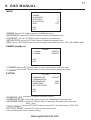
- GAMMA: Use the SET button to go to the GAMMA sub menu.
- SHARPNESS: Use the LEFT/RIGHT button to adjust the sharpness value.
- CONTRAST: Use the LEFT/RIGHT button to adjust the contrast value.
- SATURATION: Use the LEFT/RIGHT button to adjust the saturation level.
- DNR: Use the LEFT/RIGHT button to select the digital noise reduction level. - OFF, LOW, MIDDLE, HIGH
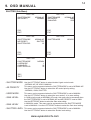
GAMMA (Sub Menu)
GAMMA
+ Y GAMMA
+ C GAMMA
PRESET 2
PRESET 3
* ESC
* EXIT
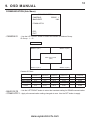
- Y GAMMA: Use the LEFT/RIGHT button to select preset gamma setting for luma.
- C GAMMA: Use the LEFT/RIGHT button to select preset gamma setting for chroma.
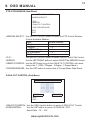
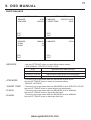
SYSTEM
SYSTEM
+ FIRMWARE VER
+ COMMUNICATION
+ SDI FRAME RATE
+ CVBS FORMAT
+ FACTORY RESET
3.07D.02F
30HZ
NTSC
* ESC
* EXIT
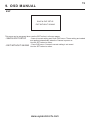
- FIRMWARE VER: Information of camera’s firmware version.
- COMMUNICATION: Use the SET button to go to the COMMUNICATION sub menu.
- SDI FRAME RATE: Use the LEFT/RIGHT button to select the SDI output video frame rate
- 30HZ , 25HZ
- CVBS FORMAT: Use the LEFT/RIGHT button to select the TV out video format - NTSC, PAL
- FACTORY RESET: Use the SET button to action start of reset.
Clear all setting and initialize to factory setting.
www.eyesoniccctv.com