1
Hook it up
To set up your ShowBox to display graphics images, connect it to your display device and power
source, and insert a USB flash drive with the graphics images. If you wish to configure the
ShowBox or give your presentation manually, you may also insert a mouse.
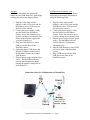
The connectors for the power adapter and
the VGA display cable are on the back of
the ShowBox chassis.
The connectors for the USB flash drive and
the optional USB mouse are on the front of
the ShowBox chassis.
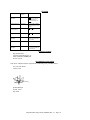
The order things are connected will be different depending on whether you want to begin playing
images automatically or first go to the configuration and thumbnail screen.
Connection Order for Autoplay
Digi ShowBox Setup Guide (90000898 Rev. C) – Page 2