1
◆Switch OFF OUTPUT breaker;
At this time the bypass source will supply to the load through the MAINTENANCE
breaker.
Switch to normal operation (from mechanical bypass)
CAUTION!
Never attempt to switch the UPS back to normal operation until you have verified
that there are no internal UPS faults
◆ Open the front door of the UPS to be easily access to the main power switch.
◆ Switch ON the output breaker of the module.
◆ Switch ON the input breaker.
The UPS powers from the static bypass instead of the maintenance bypass, then
the bypass LED will light up.
◆ Switch OFF the maintenance bypass breaker, then the output is supplied by the
bypass of the modules.
◆ Put on the maintenance switch cover.
The rectifier will operate normally after 30 seconds. If the inverter works normally, the
system will be transferred from bypass mode to normal mode.
4.2.4 Black(Cold) start procedure
CAUTION!
Follow these procedures when the input AC Utility Failure, but battery is normal
◆ Turn on the battery switch.
The battery will feed the Auxiliary power board.
◆ Turn on the Output switch
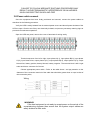
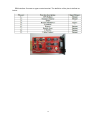
◆ Trigger the cold start button of the module as the position 5 of the above
drawing.
When battery normal, rectifier starts operation, 30s later, inverter starts and
operates and battery LED on
CAUTION!
Wait f or approximately 30 seconds when close the battey switch bef ore
you press the black start key
4.2.5 Shut down procedure
16