1
THE PULLER
CONTROL
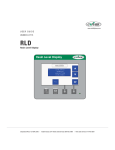
The M-Trim control is an optional operator interface for the belt
puller. Instructions for any optional controls can be found in the
Appendix of this User Guide.
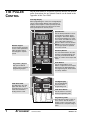
Four-Digit Display
When programming the control, the four-digit display
shows control settings. During normal operation, it
displays either setpoint or actual speed (tach). Both
setpoint and actual speed are expressed as either
linear speed (ft/min or cm/min) or rpm.
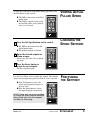
Speed Buttons
Use the Set Speed button to enter
and monitor the setpoint speed.
Pressing the Tach button displays
the actual speed. When you select
one of these, the LED in the corner
of the button lights. Either Set
Speed or Tach is active at all times.
NOTE: The actual speed shown is
the average speed. It is updated
once every second.
Numeric Keypad
Use the numeric keypad to
access control parameters,
adjust program settings
and change the setpoint
speed.
Data Entry Buttons
The Clear button deletes the value
showing on the digital display that
you have just entered. The Enter
button to confirms and accepts data
values.
Scroll Buttons
Use the Up and Down scroll
buttons to adjust the active setpoint
displayed on the digital display by
one engineering unit. These buttons
are always enabled.
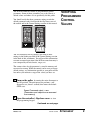
Programming Keypad
Flip open the bottom
control cover to reveal the
programming keypad.
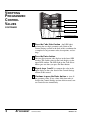
Two-Digit Display
The two-digit display
shows the active
programming code.
Code Select LEDs
The LED next to the code
lights when that code is
selected. These are not relevant when the Master
Scaling format is used.
Code Select Button
Use this button to enter the
desired programming code.
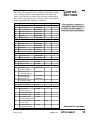
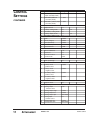
Programming codes
This table lists the major codes for
you to choose. See the Control
Settings section in the back of this
attachment for a complete listing of
codes.
1
ATTACHMENT
Fenner Control
IME005/1102