1
BridgeMaster Software User Manual
5.6
Verifying OPC Tags
In runtime, a user can verify the status of all OPC Items within all tag maps of all Active Groups
in the currently running configuration. Select <Utility | Verify OPC Tags> from the main menu to
check all OPC Items. If an error was found with one or more items then a message will be
displayed in the message pane of the main window with the last error. Otherwise, the following
messages will be displayed indicating successful connection with these items.
MSG :: Verifying OPC Tags in Server A...
MSG :: OPC Tags Verified!
MSG :: Verifying OPC Tags in Server B...
MSG :: OPC Tags Verified
5.7
Validate all Connectors NEW!
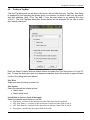
The utility function is useful to validate your configuration including validating all connectors,
groups, tag maps and Conversion tables in the current configuration. Select <Utility | Validate All
Connectors> from the main menu to validate all connectors. If an error or warning was found
with one or more connectors then a message will be displayed in the message pane of the main
window with the last error. Otherwise, the following messages will be displayed indicating
successful connection with these items.
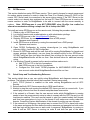
EVENT:
EVENT:
EVENT:
EVENT:
Connector1>Validating Connector...
System>Validated Connector <Connector1>, 0 errors 0 warnings found!
System>Validating Translation Tables...
System>Validated all active Connectors and Translation Tables: 0 errors 0 warnings found!
The RoviSys Company
Version 1.5
Page 49 of 73