1
Chapter 6: Documentation
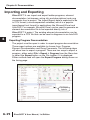
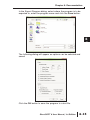
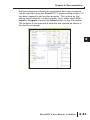
Exported programs, element documentation and rung comments
can be imported using the DirectSOFT 6 programming window if it
has been opened to edit another program. This is done by first
saving and closing the current program. Next, either select File >
Import > Program or press the Import button on the File toolbar.
The program to be imported is selected and opened as shown in
the previous example.
DirectSOFT 6 User Manual, 1st Edition
1
2
3
D
5
6
7
8
9
0
1
2
3
4
A
B
C
D
6-21