1
System Requirements :
PC with embedded SD card reader, or USB port to
connect with card reader
Windows 2000, XP, Vista Operation system
CD-ROM device
SD card location :
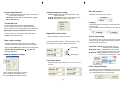
Voltage frequency setting:
None Î Applicable for electronic fluorescent lamp
without area limit.
60 Hz Î Applicable for Taiwan, Japan, America area.
50 Hz Î Applicable for China, Europe area
Select the drive location of SD Card.
Flash Drive
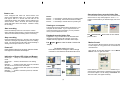
Looping :
Format SD card
If selected, permits to overwrite old data when SD card
memory is full.
If leave it blank, stops recording when SD card memory is
full.
You are suggested to use major brand SD/SDHC
memory card to ensure 100% compatibility with our
device. Below are some recommended SD card brands:
Adata/Apacer/Kingston/SanDisk/Transcend…etc.
Looping
Insert SD card in your computer card reader, select
FAT32 to format the SD card..
Time & date setting :
Set time interval to 0 minute 0 second
Start camera settings
For the first time use of camera device, you need to
configure the formatted SD card with camera settings.
Looping
Digital Still Camera mode :
Press Record/Stop button to take still picture, press
Record/Stop button again to take second picture.
Ascending
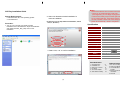
Open installed AVI Player to start SD card configuration.
Options ÎCamera Settings Æ complete the
following selection.
Save real-time clock to SD card and load to camera
device as long as configured SD card is inserted to
camera device and power on.
System Time Î set system time of PC as
starting time of recording.
System Time + 1 min.Î set system time of
PC plus 1min as starting time of recording.
System Time + 5 min.Î set system time of
Descending
Camera resolution setting:
PC plus 5mins as starting time of recording.
Set time to
Set time to
Time-lapse mode:
Select recording time interval from 1 second up to 3
minutes.
Finish camera settings
Click “OK” to save camera settings in SD card. Take out
SD card and insert it to camera device and press power
on to load all settings into camera device.
1280 x 1024 Î 1.3M resolution camera
640 x 480 Î VGA resolution camera
320 x 240 Î QVGA resolution camera
{3}