1
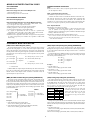
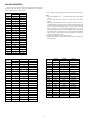
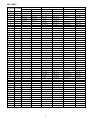
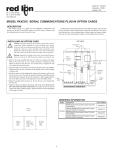
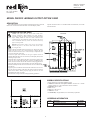
RS485 COMMUNICATIONS RECEIVING DEVICE PAX METER The RS485 communication standard allows the connection of up to 32 devices on a single pair of wires, distances up to 4,000 ft. and data rates as high as 10M baud (the PAX is limited to 19.2k baud). The same pair of wires is used to both transmit and receive data. RS485 is therefore always half-duplex, that is, data cannot be received and transmitted simultaneously. +5V 33K Transmit Enable 12 13 B(-) A(+) 33K 14 COMM. * 15 NC * OPTIONAL Terminal Block Connection Figure Extended Comms Connection Figure SERIAL SET-UP DIP SWITCH OPERATION For the serial bank, the following settings apply: Serial port configuration is accomplished through two banks of DIP switches on the MODBUS card. The bank of 8 switches sets the Unit Address, the bank of 7 switches sets the Serial port parameters (ASCII/RTU, 7/8 bits, Parity, and Baud rate). Changes to the switch settings are only detected on power-up of the unit. After changing a switch setting, power to the unit must be cycled for the new switch setting to take effect. SWITCH SETTINGS AVAILABLE 1 OFF: ASCII ON: RTU RTU 2 OFF: 7 Bits ON: 8 Bits 8 Bits 3 OFF: None ON: Parity No Parity 4 OFF: Even ON: Odd 5 Baud Rate 6 Baud Rate 7 Baud Rate OFF (See Baud Rate Switch Selections) BAUD RATE SWITCH SELECTIONS Both unit address and serial set-up are set via DIP switches on the MODBUS option card. See the DIP switch setting table for more details on these DIP switches. For the Unit Address bank, the high order bit is switch 1, and the ON position is a ‘1’, the OFF position is a ‘0’. Legal unit addresses are 1 to 247. When a Unit Address of 0 is selected, the card responds to Unit Address 1. When a Unit Address of 248 through 255 is selected, the card responds to Unit Address 247. 2 FACTORY SETTINGS 5 6 7 38400: ON ON ON 19200: ON ON OFF 9600: ON OFF ON 4800: ON OFF OFF 2400: OFF ON ON 1200: OFF ON OFF 600: OFF OFF ON 300: OFF OFF OFF 9600