1
Accessing the Provider Application
Logging onto the SAFE Account
The Nonpublic Registration Application is accessible through ODE’s Web-secure portal known as SAFE (Secure
Applications for Enterprise). Users can enter SAFE through the SAFE Sign In link located at the top of the ODE
Home Page.
[Note: If you do not have a SAFE account, please refer to Appendix A.]
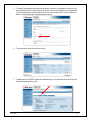
If your SAFE account username and password are forgotten or misplaced, click on the Forgot user name or
password? link next to the Sign-In field (see arrow in preceding illustration), and follow the prompts. If you have
changed your e-mail addresses since the last time you signed in, please contact your OEDS-R Administrator to
update your e-mail address in the system before attempting to sign in.
Accessing the Scholarship Application
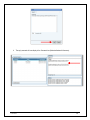
Once successfully logged onto your SAFE account, the Scholarship link should be listed in the web systems column
on the Account Maintenance page.
[Note: If you have established a SAFE account and do not have access to the Scholarship application as illustrated
by the arrow below, refer to Appendix B.]
1. To open the scholarship application system, click the Scholarship link (Illustrated below with the arrow).
11.30.2012
3