1
Quick Reference Guide- Fast T-Jet 3
Adjustment Utilities
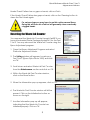
8. Click on the Read button once more to record the initial value of 1777.
9. When the Information pop-up appears, click on OK.
10.Select Finish from the bottom of the Waste Ink Pad Counter window and exit
the Adjustment program.
11.Turn OFF your Fast T-Jet 3 by using the Power button and Power
switch, located on the rear of your printer adjacent the power
cord.
12.Manually center the Print Bed by applying a light pressure against it with your
hand.
13.The final step is a Manual Reset of your printer. This will complete the Waste
Tank Reset process.
▪▪
▪▪
▪▪
While holding down the Power button, flip the Power switch.
The Print Bed will begin to move back and forth. Don’t interfere with its movement, this is part of the reset process.
Allow the Print Bed to move back and forth at least 2 times, then turn OFF the printer using the Power switch.
14.Turn ON your printer, using the Power switch, but this time DO NOT hold down
the Power button.
15.Press the Power button and allow the printer to go through its start-up cycle.
6
1-800-408-0040
(01) 201-797-1504
info@equipmentzone.com