1
ENGLISH
Game Profiler Wizard
Using the P750 in Digital Mode
The Game Profiler Wizard allows you to download game profiles for your favorite games from
either the Saitek Product Companion CD or the Saitek Website. These are profiles written by
our in-house gamers to help you get the most from you new Saitek controller in as little time
as possible. To run the Game Controller Wizard, follow these simple instructions:
In this mode, the Saitek P750 works as a standard digital gamepad.
1
After you have completed testing your Saitek P750, you will then be asked to run the
Game Profiler Wizard, click on Yes to proceed.
2
At the Welcome dialog box you will be prompted to Import the Game Profiles for your
controller via either the Internet or the CD. Check the box next to CD and click on
Continue. The software will scan your computer for those games you already have
loaded and will load the corresponding profiles.
3
When the Game Profiler Wizard has completed loading the profiles, click on Next and
then Finish. Your Saitek P750 is now ready for gameplay.
Important Notice: If you connect the P750 before installing the Saitek Gaming Extensions
software, the Saitek P750 will not operate correctly. To solve this problem, run the NukeUSB
utility (found on the Saitek Product Companion Disc CD), remove the P750, restart the
machine and then continue the installation in the correct order.
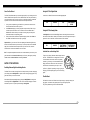
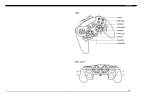
DIGITAL LED
MODE
ANALOG STICK
ON
DIGITAL
N/A
D-PAD
FUNCTIONS AS
D-PAD
Using the P750 in Analog Mode
In Analog Mode, as well as the standard Digital features, the Analog Stick becomes active.
Used with the Throttle Wheel, it makes the P750 ideal for use with those games that require a
high level of control. In this mode, the D-Pad becomes a POV Hat Switch.
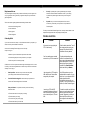
ANALOG LED
MODE
ANALOG STICK
D-PAD
ON
ANALOG
FUNCTIONS AS
ANALOG STICK
FUNCTIONS AS
HAT SWITCH
Lockable Axis on the Analog Stick
Note: To avoid potential problems and conflicts, it is recommended that you remove any other
game controllers from the Game Controllers dialog box. Do this by selecting the previously
installed controller in Game Controllers and clicking on Remove.
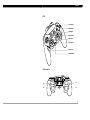
SAITEK P750 FEATURES
Switching Between Digital and Analog Modes
The Saitek P750 comes with an Analog Stick for increased precision, performance and playing
power. Simply select the Analog Mode for complete control in driving and flying games or any
game where accuracy in movement is crucial.
Switch between Digital and Analog Modes by pressing the Analog Button for Analog Mode
and the Digital Button for Digital Mode. The LED next to each button will light up to indicate
what mode the pad is in. The power-up default setting is Analog Mode.
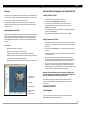
To improve your gaming, Saitek have added a unique feature to
the P750 – a lockable axis for the Analog Stick. This is ideal
for those situations when the axes need to be separately
controlled, eg, for steering or for accelerator/brake function.
Simply press down the button to the side of the stick and
rotate the dial to the direction lock you require - either
“Up/Down” or “Right/Left” depending on the type of game you
are playing. This will especially improve your control in driving
games.
Throttle Wheel
The Saitek P750 comes with a Throttle Wheel for improved play - especially in driving and
flying games. It is situated in the optimum position for precision fingertip control.
The power-up default setting for the Throttle Wheel is ON.
5 6