1
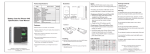
Notes: •When the iPhone battery is fully drained in your iFans battery case, the iPhone charging icon will revert to its normal usage. •The battery case includes a USB cable. Use the provided USB cable to charge your battery case. Charging your Battery Case and iPhone 4/4S: Connect your battery case (iPhone already installed) to the USB power cable Connect the USB power cable to any USB power source such as computer to start charging. Charge until the LED indicators read full. Charging your iPhone 4/4S with Battery Case: Press the power button (about 3s) to charge your iPhone in condition of no external USB power sources Press again the power button (about 3s) to turn off the battery case when iPhone is fully charged, which can significantly save the capacity of built-in battery so as to charge the iPhone next time. LED indicators: MODE CHARGING LED2 LED3 LED4 Power<25% LED1 BLINKING OFF OFF OFF 25%≤ Power<50% ON BLINKING OFF OFF 50%≤ Power<75% ON ON BLINKING OFF 75%< Power ON ON ON BLINKING FULL ON ON ON ON LED1 LED2 LED3 LED4 75%≤ Power≤100% ON ON ON ON 50%≤ Power ≤75% ON ON ON OFF 25%≤ Power≤50% ON ON OFF OFF Power ≤25% ON OFF OFF OFF Empty OFF OFF OFF OFF MODE DISCHARGING Package Contents: iFans Power Pack USB power cable User Manual * 2 Changeable Frames included. Warning: 1. To extend storage, please fully charge IFANS power pack before first use. 2. Be cautious of excessive drops, abrasions or other impacts to IFANS power pack. Please stop using immediately if any abnormal phenomenon occurred. 3. Do not expose IFANS power pack to wet or damp conditions, please keep it dry. 4. Do not use near heat emitting appliances. 5. You are suggested to use included USB cable to charge IFANS power pack, others might cause compatibility problem.