1
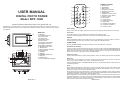
Play/pause button: Press PLAY/PAUSE button to pause during playback, press this button again will
resume playback.
Navigation buttons: Press navigation buttons to select the desired items or rotate the picture during
picture playback.
Enter button: Press this button to confirm selection.
Stop: Press STOP button to stop during playback. Press PLAY/PAUSE to resume playback.
F.BWD/previous: Press this button once during play to skip a file or picture backward, press and hold this
button during normal playback of video or audio files, the playback speed will cycle with each press as:2X,
4X,8X, 16X,32X,Normal
Press PLAY to resume normal playback.
F.FWD/next: Press this button once during play to skip a file or picture ahead, press and hold this button
during normal playback of video or audio files, the playback speed will cycle with each press as:2X, 4X,8X,
16X,32X,Normal
Press PLAY to resume normal playback.
Mute:Press the MUTE button, the audio output of the main unit will be shut off; pressing this button again
or VOLUME button will resume the audio output.
Volume+ & volume-:Press volume + button to increase the volume, and press volume- button to reduce
the volume.
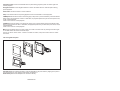
Inter-changeable faceplate
Assemble panel: to install the faceplate, locate the faceplate to the photo frame by aligning them point to
point as above show, then clasp the panel slightly to assembly it .
Disassemble pane :lift the faceplate from the screen directly.
-ENGLISH 5-