1
.
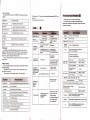
Play mode(submenu)
Short press'MODE'to enter into "PLAY MODE" to choose when it is playing.
O Repeat
'l'ip: Short press "PLAY" to oxlt from the
monu qulckly aft€r pr6ssing 'MODE" to set
the option.
B Normat
Play ono by one
B Repeatone
Rep€atedly play the single one
ft
Folder
Play all of the music in.the document
ff
E
Repeat Folder
Repoatodly play all of ths music in the document
RepeatAll
Repeatedly play all of the music
Nominal Capacity is not equal to acfual capacity.
Our company reserves the right to modiff the technical
It can take effect for all of ths m6nu.
specifications. Specifications are subject to change without notice
for further improvement.
&ffinffiiitiitrlr,,rrr,i
@
OSHUFFLE
'ii
B Random
I
playthemusicinthecurrentfolderatrandom
OINTRO
B lntro
I
Dimension
Weight
About 25 gram
Display screen
128-32 LCD
Available
capability
Pl6y each music for iust 10 seconds
85.3mmx26.1mmx13mm
FLASH: 1 GB,2GB,4GB,8GB
O Play speed
Uninstalled the driver in
It is available to choose different speed(such as faster or slower) when it is
playing(only for MP3 document); Short press'MODE" to enter into play submenu,
ths WndowsgS operating
8y8tom
lnstall the driver
(s66 lnstalletion for
tho uscr tools software)
Built-in lithium battery, charging through
USB or car power adapter
Power
then "NEXT" to choose "play speed", short press'MODE" again to enter "play
speed" menu, 'NEXT'to be faster, "PRE'to be slower.
Notice: lt will take effect for every song and won't change until you change the
setting next tima.
Maximum of the earphone
(L)l omw + (R)1 0mW,32 ohm
fi
lncapable to
copy the file
Format the car media
player to be the FAT
form and copy again
O System setting
MP3 bit
,f
MP3. WMA.
WMV. ASF
rate
WMA,WAV,ASF bit
SKbps- 320Kbps
rate
SKbps
Frequencyresponse
You can set the system parameter, and err'ery option can be cftanged wih he finrMare
updating and upgrading.
lmbalanced degree of
Enter into the main menu, put "NEXT" to get into "system setting", short
Bilef introduction for every parameter option in the system setting:
FM transmitter
Music file
Make sure the right
language chosen
Record time
Record th€ date and time for saving the voice document
Backlight time
Time for backllght
Frequencycoverage
Sot different klnds of language
Power off
Set the countdown time to power off automatically
Working temperature
Relative humidity for storage
Contrast
S€t the contrast for tho diBplay screen
Online mode
For dlfferent 8pac6
Memory information
See the memory slze
Firmware version
Firmware vorsion of the media player
Firmware upgrade
Only for firmwaro upgrading
Exil
Exit from th6 lnterface
computer during
upgradlng
Atmospheric pressure
Make sure car media
player connect with
computer during
upgrading. lnterruption
can damage the file
during upgra(ing.
>3metres
-5t -40t
-10b - 55t
20% - e0% ( 40t
86KPa
)
- 1 06KPa
Language
Simplo Chinese, English, Traditional Chinese,
German, French, ltalian, Spanish
Hardware
IBM Compatible pc, laptop with USB port, Apple computer
OS
1r
88MHZ-107MHZ
MP3, WMA. WMV, ASF. WAV
Temperature for storage and transportatior
Unconnected with the
|
Effectivedistance J
and transportation
Language
+ 0.5db
sound track
press "MODE" to enter into.
- 384Kbps
20HZ-ZOKHZ
ndows 98/Me/20001xp/serve2003,Mac9.x/X,
Linux 2.4.2 or more advanced version
Wi