1
Plug in USB receiver → Keyboard Setup Assistant → Click “Continue” → Identify Your Keyboard → Press
any key on the keyboard → Select “Skip” → Choose “ANSI” → Click “Done” button
Insert the batteries
Open the battery cover and insert the supplied batteries with correct
polarity. Now you can use this product.
+ -
Note After inserted batteries, the laser function will become available.
Please pay attention not point to any other person’s eyes when
pressing the laser button.
-
+
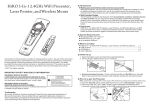
Function and operation
Icon
Function and operation
Press this button to shoot laser beam
(1) Click this button to go to previous slide
(2) Press and hold over 1 second to start continued slide up at speed about 2~3 slides per second.
Release your finger to stop slide up
st
(1) Click to start the slide show from the 1 page
(2) Press and hold over 1 second to exit the slide show
(1) Click this button to go to next slide
(2) Press and hold over 1 second to start continued slide down at speed about 2~3 slides per
second. Release your finger to stop slide down
Press this button to shoot white LED light
Status
(1) Light up when pressing the laser button
indicating (2) Quick blink in 5 times after pressed any function key when battery power is detected low. Please
LED
replace with new batteries soon for a stable control.
Note To avoid battery power consumption due to unintentional touch, any key function will be
automatically stopped after a continued pressing over 30 seconds!
ID Link
No need to conduct ID link process whenever you want to use this product,
UNLESS battery power is normal and USB receiver is within connection
distance but the product cannot be operated OR when you want to use plural of