1
Contents
Contents
1
2
2.1
3
3.1
3.2
3.3
3.4
4
4.1
4.2
4.3
5
5.1
5.2
5.3
5.4
5.5
5.6
6
6.1
6.2
Introduction
Getting Started
Quick Start
Overview
About the TP-107AVR / TP-122 Kits
Controlling via the RC-108 and RC-116 Presentation Controllers
Shielded Twisted Pair (STP) / Unshielded Twisted Pair (UTP)
Recommendations for Achieving the Best Performance
Your Line Transmitter, Receiver and Presentation Controllers
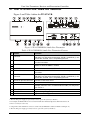
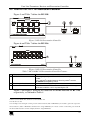
Your TP-107AVR XGA / Audio Line Transmitter
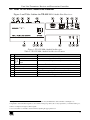
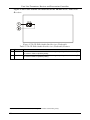
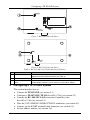
Your TP-122 XGA / Audio Line Receiver
Your RC-108 / RC-116 Presentation Controller
Configuring a TP-107AVR System
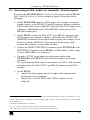
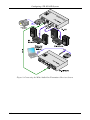
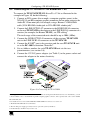
Connecting an XGA / Audio Line Transmitter / Receiver System
Connecting the TP-107AVR/TP-122 BoardView™ Kit
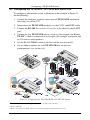
Configuring the TP-107AVR / TP-122 Kit with the RC-108
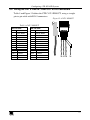
Wiring the CAT 5 LINE IN / LINE OUT RJ-45 Connectors
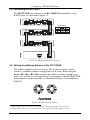
Connecting via the K-NET
Setting the Address Number of the TP-107AVR
Controlling the TP-107AVR
Controlling the TP-107AVR / TP-122 Kit via the RC-108
Controlling the TP-107AVR / TP-122 Kit via an RS-485 Controller
1
2
2
4
4
6
6
6
7
8
9
11
12
13
15
16
17
18
18
19
19
20
6.2.1
RS-485 Communication Protocol
21
7
8
8.1
8.2
Installing a Remote Button
Flash Memory Upgrade
Downloading from the Internet
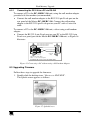
Connecting the PC to the RS-232 Port
22
22
22
22
8.2.1
Connecting the RC-108 to a PC via RS-232
23
8.3
9
Upgrading Firmware
Technical Specifications
23
28
Figures
Figure 1: TP-107AVR / TP-122 Configuration
Figure 2: TP-107AVR XGA / Audio Line Transmitter
Figure 3: TP-122 XGA / Audio Line Receiver
Figure 4: TP-122 XGA / Audio Line Receiver (Underside)
Figure 5: RC-108 Presentation Controller
Figure 6: RC-116 Presentation Controller
5
8
9
10
11
11
i