1
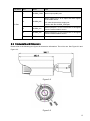
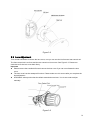
3 Installation 3.1 Device Installation Please follow the steps listed below to install the device. Please refer to Figure 3-1 for reference. Please draw the installation holes in the installation surface and then mark three expansion bolts holes in the surface. Insert three bolts in the hole and secure firmly. Please line up the installation holes of the bottom of the pendant mount bracket to the installation holes in the surface. Then insert the three bolts to the holes of the bottom of the bracket. Finally fasten the device on the installation surface. Figure 3-1 3.2 SD Card Installation Use the inner hex wrench from the installation accessories bag to remove the four inner hex screws from the rear cover. Please refer to Figure 3-2 to find the SD card slot position. Insert the SD card and the fix the four screws of the rear cover. Important Please make sure the cable connection between the power board and the main board is firm. Otherwise, it may result in device malfunction. The rear cover of the device adopts the waterproof design. Please secure four screws firmly after you complete the SD card installation. 15