1
Introduction
How to Read this Operation Manual
■ The specifications are slightly different, depending on the model. However, you can connect
and operate all models in the same manner.
• In this operation manual, the illustration and the screen display are simplified for explanation, and
may differ slightly from the actual display.
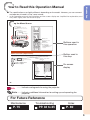
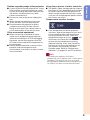
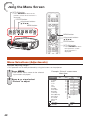
Using the Menu Screen
RETURN button
• Press RETURN to return to the
previous screen when the menu is
displayed.
ENTER button
Adjustment buttons
(P/R/O/Q)
MENU button
MENU button
Adjustment buttons
(P/R/O/Q)
ENTER button
RETURN button
• Press RETURN to return
to the previous screen
when the menu is
displayed.
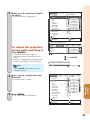
Menu Selections (Adjustments)
Button used in
this step
Example: Adjusting “Bright”.
• This operation can also be performed by using the buttons on the projector.
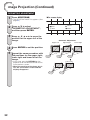
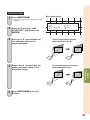
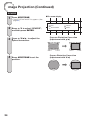
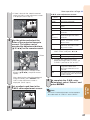
1
Press MENU.
2
Press Q or O and select
“Picture” to adjust.
• The “Picture” menu screen for the selected
input mode is displayed.
Buttons used in
this operation
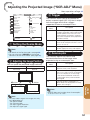
Example: “Picture” screen menu
Menu item
Picture
SIG
Picture Mode
Contrast
Bright
Color
Tint
Sharp
Red Gain
Green Gain
Blue Gain
CLR Temp
IRIS1 (Manual)
IRIS2 (Auto)
Eco+Quiet
Advanced
Reset
SCR
PRJ
Standard
Net.
0
0
0
0
0
0
0
0
0
On-screen
display
High Brightness
On
Off
SEL./ADJ.
RETURN
ENTER
END
42
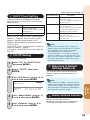
Info .........Indicates safeguards for using the projector.
Note ....... Indicates additional information for setting up and operating the
projector.
For Future Reference
Maintenance
P. 75
Troubleshooting
PP. 83 to 85
Index
P. 89
3