1
North Carolina Department of Health and Human Services
Division of Social Services
Economic Independence Section
FSIS User’s Manual
Change #3-2006
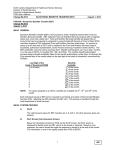
NCXPTR - REPORT DISTRIBUTION SYSTEM
J 1 V22: Favorites
Command ==Î
November 1, 2006
Line 1
Scroll ==Î13
Commands: PRO – Update Favorites (via Profile)
Options:
B
– Display on terminal
X – List report indices
S
– List report versions
V – List report views
PRT – Print
Q – Add to Work Queue
SQ
– Structured Query
N – Version Notes
Use END command to exit. Use LEFT command to list more report
information.
Opt
Type
DIR
RPT
RPT
RPT
RPT
Title
Last CMD
MY DIRECTORIES
DHRSL ACT QC ISS SLII – SLA487-01
DHRSL CASES DUE REDETERM-SLER940
DHRSL EXPED OVER 5 SLEM385-01
DHRSL FOOD STAMP RECOUPMENTS
(Report titles vary depending on your User Profile)
If the V22: Favorites screen does not list all your report, key AFV in the OPT
column to the left of MY DIRECTORIES. Press ENTER. Key LR at the
command line. Press ENTER. MY DIRECTORIES is expanded to display all the
reports in your profile.
C.
Press PF8 to scroll forward or PF7 to scroll backward through the list of reports
one page at a time.
D.
If you know the name of the report or the prefix of the report you are looking for,
you can search the list of reports by entering on the command line, the letter F
and the report name or prefix enclosed in single quotes (You must be at the top
of the list of reports). Press Enter.
Ex: f DHREJ
F ‘DHREJ MED REG RUN’
The first report in your list with the prefix or report name you searched for
displays at the top of the list. You must still use one of the “options” to display
the report.
102.03
NCXPTR LATEST REPORTS OPTIONS
A.
Command Pro – INITIAL LIST OF REPORTS
This command allows you to add and/or remove report directories from your User
Profile. Refer to VIII below for instructions on modifying your User Profile.
B.
OPTION B – DISPLAY ON TERMINAL
1.
Key B under the “Opt” column to the left of the report you want to view.
Press Enter.
2
102