1
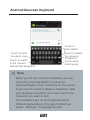
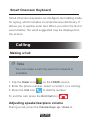
Smart Onscreen Keyboard Smart Onscreen keypad is an intelligent text editing mode for typing, which includes a comprehensive dictionary. It allows you to quickly enter text. When you enter the first or second letter, the word suggested may be displayed on the screen. Calling Making a Call Note You can make a call only when the network is available. 1. Tap the Dialer icon on the HOME screen. 2. Enter the phone number, select a contact, or a call log. 3. Press the Call icon to dial the number To end the call, press the End Call icon Adjusting speaker/earpiece volume During a call, press the Volume Keys up / down to 22