1
Connecting Your FC-4002 Format Converter / TBC
6
Connecting Your FC-4002 Format Converter / TBC
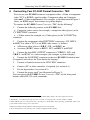
You can use your FC-4002 to convert a composite video, s-Video, or component
video (YUV or RGB/S) signal to either: Component video, or Composite
video and1 s-Video simultaneously. For example, as the illustration in Figure 3
shows, an RGBS output2 that connects to a plasma display.
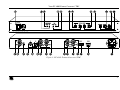
To connect the FC-4002 Format Converter / TBC, do the following3:
1. Connect the following sources to the FC-4002, the:
Composite video source (for example, a composite video player) to the
CV INPUT BNC connector
s-Video source (for example, an s-Video player) to the Y/C INPUT 4p
connector
2. Connect the component video INPUT BNC connectors, G/Y, B/B-Y,
and R/R-Y to either a YUV or an RGB video source, as follows:
A Betacam video player to R/R-Y, G/Y, and B/B-Y, or
A camera (RGBS) source to R/R-Y, G/Y, and B/B-Y and SYNC
3. Connect the four BNC OUTPUT connectors: CV/R/R-Y, G/Y, and
C/B/B-Y, and SYNC to a video acceptor (for example, a plasma display).
4. Connect the LOOP BNC connector to the next FC-4002 Genlocked unit
(if required) and release the Term button for looping4.
5.
Connect a Genlock source to the SYNC BNC connector.
6.
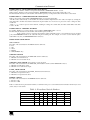
Connect a PC or other controller, if required (see section 6.1).
7.
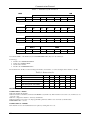
Set the dipswitches (see section 6.2).
8. Connect the power cord5 (not illustrated in Figure 3).
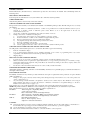
You can operate the FC-4002 Format Converter / TBC via the front panel
buttons and/or RS-232 serial commands.
1 When only one output is required, connect that output of the FC-4002, and leave the other outputs unconnected
2 Alternatively, you could connect composite video or s-Video or component video (Y, B-Y, and R-Y, or RGB)
3 Switch OFF the power on each device before connecting it to your FC-4002. After connecting your FC-4002, switch on its
power and then switch on the power on each device
4 Pushed in terminates the input. Release when the input extends to another unit
5 We recommend that you use only the power cord that is supplied with this machine
6
KRAMER: SIMPLE CREATIVE TECHNOLOGY