1
Selecting Modes
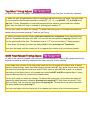
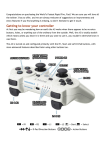
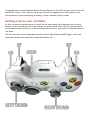
To select a mode, hold RT and tap & release the Sync button however many times for the
mode you want and then release RT.
So to select Mode 11 you would hold RT, then tap the Sync button 11 times, and then release
RT. The light will flash with each press of Sync, and then when releasing RT will flash back the
number of the mode you are now in (in this case 11 times).
The light doesn’t flash 11 times for 11, or 77 times for 77 as you would be waiting forever. So
what it does is flashes slowly for 10s, and fast for 1s. So 1 slow and 1 fast flash means (10 + 1) =
Mode 11. If you entered Mode 64 it would flash 6 slow and 4 fast.
Quick Enable / Disable
If at any point you want to quickly disable the chip, simply tap Sync button without any other
buttons pressed. The light will flash rapidly several times then go off. The chip is now disabled.
If you were previously in a mode and want to quickly get everything back on, tap Sync again and
it will re-enter where you left off.
Chip Modes
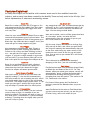
One feature that makes the Arbiter 3 Elite Controllers so powerful (not available on A3 LiTE
controllers) is the ability to totally change its list of modes, effectively making the chip like a
whole new product. For example some chips on the market have modes specifically for Call of
Duty, others a general all-rounder’s, but no other chip has the ability to be all of those in one.
This is what the A3 ‘Chip Select’ is. You can change the A3 into a Specific List of modes that
best suit you!
Master Reset
As the Arbiter 3 has many Features that can be turned on and off and rapid fire speeds and
other timings that can be adjusted by the user sometimes you just want to factory restore the
chip to the beginning in case you forget that is active and what is altered.
To master reset the chip, turn on the controller, hold down X button, tap and release Sync but
keep X held for 6 seconds. After 6 seconds the light will fade in then fade out (pulse). Your chip
is now reset.