1
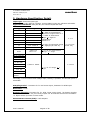
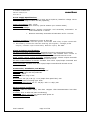
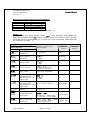
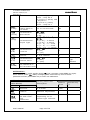
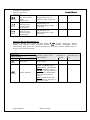
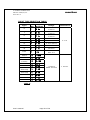
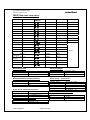
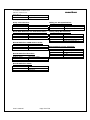
8-CHANNEL SCANNER-8208 masibus REF NO: m82A/om/101 Issue NO: 01 6. Menu Layout: RUN TIME INDICATION: Following parameters can view or change during run time. Immediately after powering, unit will run in Auto Mode. In auto mode channel will scan automatically according to scan time selection (1-250 second). Press A/M Key in run mode, Channel no scanning on display is stopped. By pressing increment key, we can change channel number manually. Le vel – 1: Pressing MENU key DATA window shows LVL1 (LvL1) message. Press MENU key again PV Display shows pWd (PWD) message, press increment key twice to select password and then press MENU key to enter into Level-1. DATA window shows SP.1 (SP.1) message and by pressing increment key, DATA window shows Set Point-1 Value Use Inc and shift key to modify value. OR press MENU key again to change Set-point 1 for Channel 2. ESCAPE KEY will use to come out SP.1 LEV EL 1 Parameter (DATA window) Symbol Name Sett ing name and descri pt ion pwd Level- 1 Passw ord 0 t o 999 9 0 000 - Sp .1 Ta rge t Set poin t- 1 SetP oi nt-1 f o r Channe l 1 t o 8. 01 0 0 ( for all 8 ch annel) - SP .2 Ta rge t Set poin t- 2 SetP oi nt-2 f o r Channe l 1 t o 8. 02 0 0( f or all 8 ch annel) Re l ay g rou p i s se le cte d 2 Hys Hystre sis Hy st re si s f or Ch anne l 1 t o 8. 00 0 2( f or all 8 ch annel) - (PWD) (SP.1) (SP.2) (HYS) User’s Manual Page 14 of 36 Def au lt v al ue S h ow s only if