1
INTRODUCTION
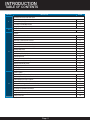
TABLE OF CONTENTS
Section
Description
Page#
Connecting Your Device with Your Tablet
1
2
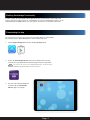
Enabling Smartbridge Functionality
4
Downloading the App
4
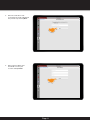
Creating a Smartbridge Account
5
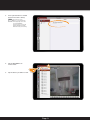
Logging the App into Smartbridge
7
Configuration
Adding Devices
9
Live View
3
Live View Feature Overview
10
Adding Cameras to Live View
11
Removing a Camera from Live View
11
Show/Hide Device Column
12
Capturing Pictures from Camera Feeds
12
Recording a Camera Feed Video Snippet
13
Muting Video Feeds
13
Using Two-Way Audio
14
Making Image Quality Adjustments
14
Controlling Alarms
15
Zooming in on a Camera Feed
15
Adding Favorites (My Cameras)
16
Adding Favorites (My Views)
17
Stopping All Camera Feeds
18
Full Screen View
18
Using PTZ Controls
19
Remote Playback
4
Remote Playback Feature Overview
20
Reviewing Recordings from a Remote Device
21
Showing/Hiding the Device Column
21
Capturing Pictures of Remote Recordings
22
Taking a Video Snippet of a Remote Recording
22
Muting Sounds
23
Pausing/Playing Remote Recordings
23
Digital Zooming
23
Stopping All Remote Playback
24
Using Full Screen
24
Page 2