1
Measurement of blood flow velocity in peripheral arteries.
Task Goal:
Measure blood pressure and then determine blood flow velocity in arteria radialis in the
right and the left arm first at rest and then at various time intervals upon defined stress
Measurement Equipment:
Phonendoscope, mercury and digital tonometer.
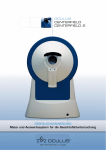
Device BIDOP, computer with software Smart-V-Link, UZ gel.
Measure in pairs.
Measurement Procedure:
1) Measure blood pressure using digital tonometer – students take each other’s blood
pressure. Put the inflatable cuff around the arm of the examined sitting person. Make sure the
cuff is at the same level as the heart. While measuring, follow instructions that belong to the
particular tonometer you are using. Take down the systolic and diastolic pressure. Perform the
measurement on both arms.
2) Measurement of blood flow velocity at rest – students in pairs make measurements on each
other
a) Turn on the computer and start program Smart-V-Link Ver2.0.
b) Put your first and last name in the field Patient Information and click on “Save.”
c) Then click on the field “Setting.” Then turn on the measurement device “Bidop” by
pressing the middle button (marked in red) and in the software setting click on ”Search
comm“. Confirm startup of the device. As soon as the connection between the device and
computer is made, you can start measuring.
d) Click on the button “Main Screen” again, than select item “Upper Limbs Segmentally.”
e) First you will measure the so-called “Right Radial.” By clicking on the field with the
corresponding heading (Right and Radial), an on-line measurement curve will be displayed.
Use palpation to find the pulse. Apply a small drop of UZ gel on that area. Then place the
probe (in the opposite direction of blood flow) at approx.. a 60-degree angle and very slowly
move until you an area with the strongest signal. As soon as the strongest signal is registered
long enough (it will no longer change on the screen), press the button on the probe. After the
curve can be read, click the field “Resolution/Finding.”
f) Repeat item e) for “Left Radial.”
g) “Print” the results – separately for each limb – first right click the mouse on the field with
the saved record of the left arm, then press print. Create a PDF document and save it in the
file “Doppler measurements” under your own name followed by letter L (left). Proceed the
same way and save the results for your right arm (your name followed by R for right). Save
both documents on your “flash disc.”