1
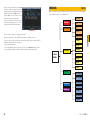
4. MENUS
TABLE OF CONTENTS
1. INTRODUCTION
2. CONNECTIONS AND CONTROLS
10
2.1 Front Panel
10
2.2 Rear Panel
11
2.3 Mouse Control
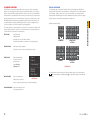
Virtual Keyboard
12
13
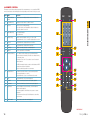
2.4 Remote Control
14
3. BASIC OPERATION
4
7
16
3.1 Operation
16
3.2 Live View
16
3.3 Login, Logout and Main Menu
Login
Main Menu
Shortcut Menu
Logout
Auto Resume
17
17
18
18
19
19
3.4 Recording
Manual Recording
19
19
3.5 Search and Playback
Search
Playback
20
21
22
3.6 Schedule
25
3.7 Motion, Video Loss and Camera Masking Detection
Motion Detection
Video Loss Camera Masking
Event Response
26
26
27
27
27
3.8 Backup
29
31
4.1 Main Menu
32
4.2 Info Menu
HDD Information
BPS
Log
Version
Online Users
32
32
33
33
34
34
4.3 Setting Menu
Encode
Snapshot
Schedule
Network
Default
35
37
39
40
40
41
4.4 Advanced
HDD Manage
Abnormality
Record
Account
Auto Maintainenance TV Adjust
42
42
43
43
43
44
44
4.5 Backup
44
4.6 Shutdown
44
5. HARD DISK DRIVE
45
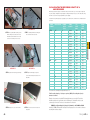
5.1 Installation/Removal
45
5.2 Calculating the Recording Capacity of a Hard disk Drive
47
APPENDIX
48
A.1 Troubleshooting
48
A.2 Minimum Computer Configuration
51
Q-SEE PRODUCT WARRANTY
Questions or Comments? Contact Us
52
53
5
Meijer.com