1
Products from LS Electronics Group
ABOUT YOUR I-SHOW:
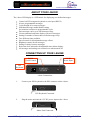
The i-show LED display is a LED matrix for displaying user defined messages.
Control via PS2/computer keyboard or serial port (RS232).
99 user programmable messages.
Cycle through all or some messages.
Individual message enable/disable setting
for inclusion/exclusion in programmable cycle.
Each message can be up to 240 characters long.
Various animated and static display effects for messages.
Setting for number of times that scrolled messages loop.
Two different fonts available.
Speed control for all animated message effects.
Brightness control for all messages.
Setting for delay between messages.
Real-time clock onboard with adjustable time & date display.
All messages and settings are retained even when turned off.
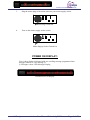
CONNECTING UP YOUR I-SHOW:
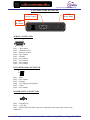
RS232
Serial Control
12V DC
Power Input
PS2
Keyboard
i-show Connections
1.
Connect your PS2 keyboard to the PS2 connector on the i-show.
PS2 Keyboard Connected
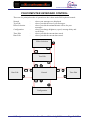
2.
Plug the mains unit into the 12V DC power input on the i-show.
Mains Unit Connected
LS Designs
i-show User Manual 2.0
July 2006
Page 3 of 23