1
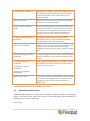
Inflation, % per annum
This is a price-indexing factor for both revenues and cost
items expressed in annual terms. For example, if your Model
is quarterly, you do not have to apply a fraction of the
annual growth rate; the Model will do it for you
automatically: inserting 10% annual growth rate would
translate in your revenues and fixed costs growing 2.5%
quarter-on-quarter.
With completion of Step 2 you are done customising your Model. You can proceed to model
request and purchase options as described in section 2.3 of the Manual.
2.3.
Requesting free model and purchasing options
After completing Step 2 you can click ‘Next’ and select ‘Request Free Model’ button. The
free model would be assembled and appear in your User Account available for download.
You will receive a notification via email that your model is ready. Note that you can always
convert any of your free or demo models stored in the User Account to full paid versions by
clicking on ‘Buy Model’ button next to its free/demo listing.
Alternatively, you can opt to purchase Full version of the model. In this case the next screen
will take you to the payment options. Upon payment confirmation the full version would be
assembled and appear in your User Account available for download. You will receive a
notification via email that your model is ready. You can always download a copy of your
model from your User Account archive.
3. Working with the Excel file of the Model
Paid for version of the Quick IRR Model provides additional functionality and reports which
are not available in a free version. The free version will have these disabled and marked with
blue shaded background. You can also change certain non-structural variables and
assumptions entered during on-line assembly stage as described below.
Please note that in the Excel file of the Model, fields marked with yellow background are data
input fields. You can re-populate these with your own data without any risk of altering the
structural layout of the Model.
Nevertheless, as it happens with financial and operating inputs, these have to be meaningful
in the context of your business. For example, negative customer additions would not yield a
sensible IRR result.
3.1.
Operating Assumptions’ box
In this area of the Model you can change business assumptions related to your project. The
Model will take care of the rest and will run your data through formulae and into the output
reports and graphs.
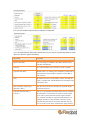
An example of the Operating Assumptions’ box is provided below.
Full version:
7|Page